
Most WordPress sites are not broken into. They are walked into, through a door the owner installed and forgot about in the form of one of these common WordPress security mistakes.
The data backs that up clearly. Across all disclosed WordPress vulnerabilities tracked by Patchstack, plugins account for roughly 89 percent and themes about 10 percent. WordPress core itself accounts for under 1 percent.
Which means the platform is rarely the problem. What gets added to it usually is, and that is where most WordPress security mistakes begin.
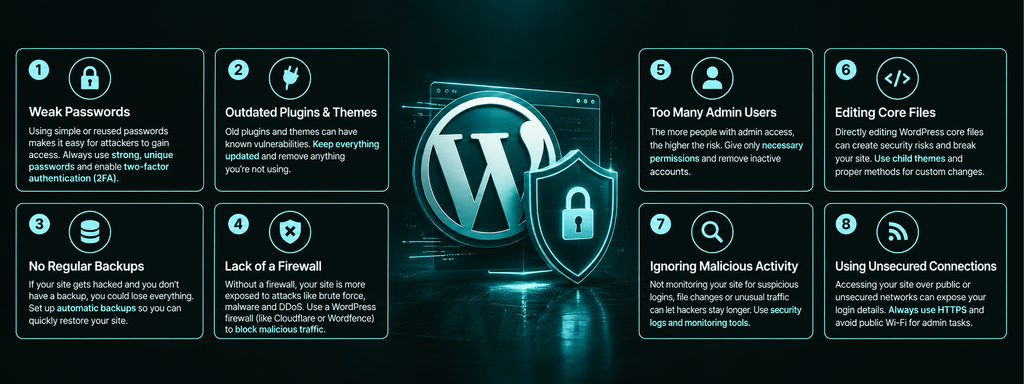
These are the eight WordPress security mistakes we see most often on sites we take over, and what to do about each one.
1. Hardening the core and ignoring the plugins
Plenty of owners keep WordPress itself updated religiously and treat the plugin list as settled furniture. This is among the most common WordPress security mistakes, because the vulnerability numbers say that effort is aimed at the wrong layer.
Core is maintained by thousands of contributors with a dedicated security team. Your form plugin might be maintained by one person who has moved on to other work.
This is a recognised category rather than a WordPress quirk. Using components with known vulnerabilities sits in the OWASP Top Ten, the reference list of web application security risks, and third-party components are where it bites hardest.
What to do. Treat every plugin as a piece of software you are responsible for. Before installing, check the last update date, the number of active installs, and whether the developer responds to support threads. A plugin last updated two years ago is a liability regardless of how well it works today.
2. Keeping plugins you stopped using
Deactivated plugins still sit on the server. The files remain, and in several documented cases the vulnerable code can still be reached directly.
This is one of the quieter WordPress security mistakes because the plugin feels handled. It is switched off, so it looks safe. The files tell a different story.
There is a sharper version of this problem. Patchstack’s figures show roughly 22 percent of disclosed vulnerabilities have no patch available at all. For those, updating is not an option. Removal is the only fix.
What to do. Delete, do not deactivate. Most WordPress security mistakes at this level are fixed in minutes.
Where three plugins are stacked to achieve one outcome, a single piece of custom development often replaces all three, with fewer moving parts to maintain and nothing to abandon. If you might need it later, note the name somewhere and reinstall it fresh when you do.
Running a full plugin audit is one of the fastest wins available on most sites. Our WordPress development and maintenance work starts here for exactly that reason.
3. Believing an update removes an infection
Of all the WordPress security mistakes on this list, this one costs people the most and is the least known.
Security researchers tracking a 2026 campaign found attackers abusing cross-site scripting flaws in widely used plugins to install a backdoor plugin and create hidden administrator accounts. The Hacker News reported that updating the affected plugins does not remove infections already in place.
Read that again, because it reverses the instinct everyone has. The patch closes the door. It does nothing about who is already inside.
What to do. After any plugin vulnerability affecting your site, update, then investigate. Check your user list for administrators you did not create. Look at recently modified files. If the site was exposed for any length of time, assume entry and verify, rather than assuming safety because the version number went up.
4. Never looking in the mu-plugins folder
Must-use plugins live in wp-content/mu-plugins. They load automatically, cannot be deactivated from the dashboard, and do not appear in your normal plugin list.
For legitimate uses they are handy. For attackers they are close to ideal.
In its analysis of a criminal operation running through compromised WordPress sites, Check Point Research documented attackers installing exactly that: a hidden must-use plugin with hardcoded credentials, allowing them to upload files including PHP, long after the original entry point was closed.
Most site owners have never opened that folder, which is what makes it effective and why it ranks among the costliest WordPress security mistakes.
What to do. Open it. Today. If wp-content/mu-plugins contains anything you or your developer did not deliberately put there, treat the site as compromised and get help. Add this folder to whatever you check after any security incident.
5. Treating the patch window as weeks
The gap between disclosure and exploitation has compressed to the point where a monthly update routine is no longer fast enough.
In October 2026, a critical flaw in the Bricksforge plugin was rated CVSS 10.0, the maximum severity score, allowing unauthenticated remote code execution. Patchstack detected exploitation attempts within days of the issue becoming known, from dozens of distinct source addresses.
Attackers scan continuously and automate immediately, which turns slow patching into one of the more expensive WordPress security mistakes available. Scheduled maintenance that runs on the first Monday of each month leaves a window that is measured in weeks against a threat measured in days.
CISA, the US cybersecurity agency, puts it plainly in its public guidance: do not delay software updates.
What to do. Enable automatic updates for plugins you trust, and monitor a vulnerability feed for the rest. Test significant updates on staging first, then deploy quickly rather than batching them. Speed matters more than tidiness here.
Need someone watching this for you continuously? That is part of what ongoing WordPress Development & maintenance exists to cover.
6. Leaving admin accounts nobody owns
Count the administrators on your site right now. Most teams find more than they expect, and stale accounts rank high among WordPress security mistakes that go unnoticed for years.
The freelancer from two years ago. The previous agency. The developer who fixed one thing in 2024. A “temporary” account created during a migration that nobody closed. Each one is a working key held by someone outside your business, often protected by a password reused elsewhere.
Attackers also create their own, which is why this connects directly to mistake three.
What to do. Audit the user list quarterly. Remove accounts nobody can name an owner for. Give contractors their own named accounts with the minimum role the job requires, and close them the day the work ends. Enable two-factor authentication on every remaining administrator.
7. Backups you have never restored
Almost every site has backups. Far fewer have backups anyone has tested, which is why untested recovery belongs on any list of WordPress security mistakes.
Two failures show up repeatedly. The first is a backup that has been silently failing for months, discovered only when it is needed. The second is a backup stored on the same server as the site, which means anything that encrypts, deletes or infects the site reaches the backup too.
What to do. Of all the WordPress security mistakes here, this is the cheapest to close. Store backups off-server. Run a real restore to a staging environment at least quarterly, because a restore you have performed once is worth more than a year of untested backup logs. Confirm your retention window is long enough to reach back past an infection you might not notice for weeks.
8. Assuming a small site is not worth attacking
The most common objection we hear is that a site is too small to interest anyone. It reflects a reasonable but outdated idea of why sites get attacked.
Check Point’s research describes compromised WordPress sites being used as infrastructure. Hosting malware. Relaying commands. Storing stolen data. The operator archive in that investigation listed close to 2,000 compromised domains, and the value of each one had nothing to do with its traffic.
Assuming obscurity is protection is one of the most widespread WordPress security mistakes. Your visitor numbers are not the target. Your server, your domain reputation and your clean SSL certificate are. Attacks are automated and indiscriminate, scanning for versions rather than selecting brands.
What to do. Apply the same basics regardless of size. A small site with current plugins, clean user accounts and tested backups is a harder target than a large one running software from 2023.
What these WordPress security mistakes have in common
Read the eight together and a pattern appears. Almost none of them are technical failures.
Nobody fails to delete an unused plugin because deletion is difficult. Nobody skips the user audit because auditing is complex. These WordPress security mistakes persist because the work is unglamorous, nothing visibly breaks when it is skipped, and the cost arrives months later wearing a different name.
That is also the good news. The fix is rarely expensive. It is mostly a matter of someone owning the routine and running it on schedule.
Worth saying honestly: if nobody on your team will own that routine, a hosted platform is a reasonable answer. A marketing site on Webflow removes the plugin layer entirely, and that trade suits plenty of businesses better than a WordPress install nobody maintains.
A 30-minute check you can run today
Five things, in order of how many WordPress security mistakes they tend to surface.
- Open the mu-plugins folder. Anything unexpected there needs attention before anything else on this list.
- List your administrators. Name an owner for each one. Remove the rest.
- Sort plugins by last updated. Anything untouched for over a year deserves a decision: replace it or accept the risk knowingly.
- Delete every deactivated plugin. If it is off, it should be gone.
- Confirm where your last backup lives, and restore it somewhere safe. Not the log. The actual file.
Most teams find at least one of these WordPress security mistakes in that half hour, and fixing it there costs a fraction of what it costs later.
Security should be a routine for your WordPress Site
The sites that stay clean are rarely the ones with the most security plugins installed. They are the ones where somebody owns the checklist and runs it every month.
Nearly all WordPress security mistakes are prevented by a routine rather than a tool. That is how we handle it at Treszon. Updates tested before they ship, user accounts audited, backups restored rather than assumed, because we operate every brand we run like we own it, and an owner does not leave the back door to their own property unlocked.
If you would rather have a team watching this for you, with us here at Treszon.
Most WordPress security mistakes are cheap to fix this week and expensive to fix after the fact.
Frequently asked questions
What are the most common WordPress security mistakes?
Running outdated or abandoned plugins, keeping deactivated plugins installed, leaving unused administrator accounts active, and assuming a plugin update removes an infection that already happened.
Is WordPress itself insecure?
No. Core accounts for under 1 percent of disclosed WordPress vulnerabilities, while plugins account for roughly 89 percent. The platform is well maintained, and risk enters through what gets added to it.
Does updating a plugin fix a site that was already hacked?
No. Updating closes the vulnerability but leaves behind anything an attacker installed, including backdoor files and hidden administrator accounts. Cleanup is a separate job from patching.
Which WordPress security mistakes should I fix first?
Start with the mu-plugins folder and your administrator list, since both reveal an active compromise rather than a future risk. Plugin cleanup comes next.
How often should plugins be updated?
As soon as practical after release for security patches. Exploitation now begins within days of public disclosure, so a monthly cycle leaves too much exposure.
How do I check whether a plugin has a known vulnerability?
Search the plugin name in a vulnerability database. The National Vulnerability Database maintained by NIST is the neutral public record, and dedicated WordPress trackers often publish ahead of it. Checking before you install prevents more WordPress security mistakes than any plugin can.
Do security plugins make a site safe on their own?
They help with monitoring, hardening and firewalling. They do not remove an abandoned plugin, close an old admin account or test a backup, which is where most of these WordPress security mistakes actually live.
How do I know if my site has already been compromised?
Look for administrator accounts you did not create, unexpected files in mu-plugins, recently modified core files, and unfamiliar scheduled tasks. A malware scan is a useful starting point rather than a complete answer.