


Your page ranks on page two, the product looks right, and the copy is doing its job. Then a shopper taps Add to Cart and nothing happens for half a second. That half second is measured, scored, and priced into both your rankings and your revenue.
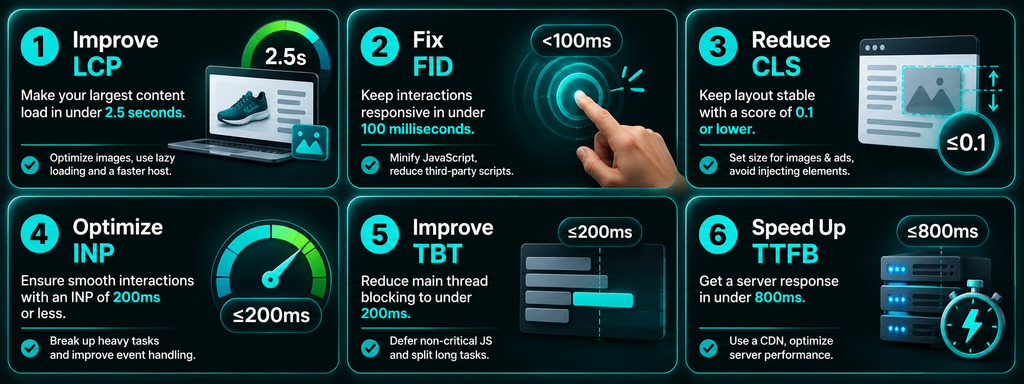
Core Web Vitals are three field metrics Google collects from real Chrome users: Largest Contentful Paint for loading, Interaction to Next Paint for responsiveness, and Cumulative Layout Shift for visual stability. A page passes when it reaches 2.5 seconds, 200 milliseconds and 0.1 at the 75th percentile. Six fixes clear almost every failing page.
Below are the six Core Web Vitals fixes we work in order, with what each one usually costs in revenue when it is left alone.
Core Web Vitals in 2026: What Changed and What Held
The Core Web Vitals thresholds held. Largest Contentful Paint still passes at 2.5 seconds or faster, Interaction to Next Paint at 200 milliseconds or faster, and Cumulative Layout Shift at 0.1 or lower, each measured at the 75th percentile of real visits over a rolling 28 days. Nothing in the primary record changed those numbers in 2025 or 2026.
The genuine 2026 change sits one layer down. With the September 2026 dataset, published on 13 October 2026, the Chrome UX Report release notes added experimental variants of all three Core Web Vitals, including soft navigation metrics for single page applications. Google says these will leave the experimental stage later without naming a date. For anyone running a headless store or a React front end, that is the update worth tracking, because soft navigations have always been the blind spot in single page app measurement.
You may have read that Google replaced per-URL assessment with a site-wide composite score this year. The primary documentation does not support it. What does exist, and has for years, is an origin-level fallback: where one URL lacks enough field data of its own, assessment falls back to the origin. That fallback is almost certainly the seed of the claim. Treating it as a new algorithm leads teams to optimize an average instead of the templates their money pages actually use.
The practical reading: keep fixing templates, keep measuring at the 75th percentile, and keep your attention on the three Core Web Vitals that were already there.
Why Core Web Vitals Show Up in Revenue Before They Show Up in Rankings
Ranking movement is slow and contested. Conversion movement is fast and measurable, which is why performance work pays for itself before the SERP reacts.
Google’s own roundup of Core Web Vitals business impact collects the numbers teams reported after shipping these fixes:
- Vodafone improved LCP by 31% and recorded 8% more sales.
- Lazada tripled its LCP and recorded a 16.9% increase in mobile conversion rate.
- Agrofy Market improved LCP by 70% and cut load abandonment by 76%.
- Cdiscount improved all three metrics and took a 6% revenue uplift through Black Friday.
- Yahoo! Japan fixed layout shift and gained 15% more page views per session.
The clearest single case is Rakuten 24, where investment in Core Web Vitals raised revenue per visitor by 53.37% and conversion rate by 33.13%.
Set against that, most of the web still fails. The HTTP Archive Web Almanac 2025 performance chapter puts the share of sites passing all three Core Web Vitals at 48% on mobile and 56% on desktop. LCP is the weakest mobile metric at 62% good, and CLS is the weakest desktop metric at 72%. Roughly half the field is leaving this on the table, which is exactly why the gain is available.
Treszon runs Core Web Vitals optimization as a scoped engagement with field data as the scoreboard, not a Lighthouse screenshot. You get the before numbers, the subpart breakdown, and the after numbers from real visits.
Fix 1: Give the LCP Element Loading Priority
Set fetchpriority=”high” on the hero image, remove lazy loading from it, and serve it at the size it renders. LCP is the Core Web Vitals metric most often decided by a single image. On a product page or a landing page, the largest element is almost always one image, and browsers routinely discover it late.
Three changes carry most of the win:
- Add fetchpriority=”high” to the LCP image so it jumps the request queue.
- Remove loading=”lazy” from anything in the first viewport. Lazy loading the hero is the most common self-inflicted LCP problem we find.
- Serve correct srcset and sizes values in AVIF or WebP, so a 400px slot stops downloading a 1,600px file.
Split your LCP into its four subparts before you touch anything: time to first byte, resource load delay, resource load duration, and element render delay. Resource load delay is where priority problems live, and it is usually the largest slice on a failing product page.
Fix 2: Lower the Server Response Time that Caps Every Other Gain
Time to first byte sets the ceiling for LCP, so a 1.2 second TTFB makes a 2.5 second target almost unreachable no matter how light the page is. Aim for 800 milliseconds or faster, because this is the first Core Web Vitals fix that makes every later one measurable.
What moves it:
- Full-page caching at the edge, so most visits never reach the origin.
- A CDN with your actual customer geography in mind rather than the default region.
- Redirect chains collapsed to a single hop. Each hop adds a round trip before any byte of content moves.
- Database and query work cached on dynamic templates, especially category pages with heavy filtering.
This is the fix that separates a fast theme from a fast site. If your TTFB sits above 800 milliseconds on a managed host, that is a hosting and caching conversation before it is a code conversation, and our WordPress development team treats it that way.
Fix 3: Break Up The Long Tasks that Delay the First Tap
Interaction to Next Paint fails when the main thread is busy with a task longer than 50 milliseconds at the moment the user taps. The fix is to make the work smaller, not faster.
Practical moves:
- Yield to the main thread between units of work so the browser can paint between them.
- Split large JavaScript bundles and load route-level code on demand.
- Defer hydration on components below the fold. A review carousel does not need to be interactive before the Add to Cart button is.
- Paint visual feedback with CSS first, then run the handler. A button that responds instantly and finishes its work a beat later scores well and feels better.
INP is the Core Web Vitals metric that punishes framework-heavy builds hardest. Desktop sits at 97% good while mobile sits at 77%, and that gap is mid-range Android hardware meeting a bundle sized for a laptop. Our React and Next.js development work starts from the interaction budget rather than the component library.
Fix 4: Put Third-Party Scripts on a Budget
Every tag you add spends main-thread time you cannot see in your own code, and most stores are carrying several they stopped using. Audit by request, not by intention. Third-party code is the most common reason a clean build still fails Core Web Vitals.
Open the network panel, sort by blocking time, and write down what each script earns:
- Chat widgets and review apps are the two heaviest additions on most product pages.
- Heatmap and session recording tools are worth loading on a sample of traffic, not all of it.
- Duplicate pixels from old campaigns stay live for years after the campaign ends.
- A/B testing tools that run synchronously cause both INP damage and visible flicker.
Load what survives the audit after interaction, from a web worker where the vendor supports it, or on a delay tied to first scroll. The same discipline applies to plugins, which is the pattern behind eight WordPress security mistakes we see repeatedly: unused code that nobody owns keeps running on every request.
Fix 5: Reserve Space for Everything that Arrives Late
Cumulative Layout Shift falls to near zero when every element that loads late already has its space held. This is the cheapest of the six Core Web Vitals fixes and the one most often skipped.
Hold space for:
- Images and video, with explicit width and height attributes or a CSS aspect-ratio.
- Ad slots and promotional banners, sized to their largest expected creative.
- Embeds, from maps to product video, inside a container with fixed dimensions.
- Web fonts, using size-adjust and font-display: optional so the fallback occupies the same box as the final face.
Desktop CLS at 72% good is the quiet failure in the Web Almanac data. Desktop layouts have more room for late-arriving blocks, so they shift more, and almost nobody checks desktop after fixing mobile.
Fix 6: Stop Injecting Content Above What the Reader is Already Looking At
Anything inserted above existing content pushes the page down and registers as a shift. Free shipping bars, consent banners, cookie notices and announcement strips are the usual sources, and together they account for most of the Core Web Vitals failures we find on otherwise fast stores.
Three rules keep this clean:
- Render the promo bar in the initial HTML at its final height rather than injecting it after load.
- Overlay consent banners instead of inserting them into the document flow.
- Reserve the space server side when a banner is conditional, so the slot exists whether or not it fills.
Restore scroll position correctly on back navigation and keep the page eligible for the back forward cache, which gives you an instant restore and a clean shift score on return visits. Webflow and Framer builds handle most of this by default, which is one reason our Webflow development projects tend to pass on the first measurement.
The Order To Work In
Core Web Vitals fixes compound when sequenced. TTFB first, because it caps LCP. Then priority, then interactivity, then stability.
| Order | Metric | Fix | Where it usually hides | Typical first-pass win |
| 1 | LCP | Server response time | Hosting tier, uncached templates, redirect chains | 200 to 600ms off every page |
| 2 | LCP | Element priority | Lazy-loaded hero, oversized images, late discovery | 0.5 to 1.5s off LCP |
| 3 | INP | Long tasks | Bundle size, eager hydration, heavy handlers | 50 to 150ms off INP |
| 4 | INP | Third-party scripts | Chat, reviews, heatmaps, stale pixels | 30 to 200ms off INP |
| 5 | CLS | Reserved space | Images without dimensions, ad slots, fonts | 0.05 to 0.2 off CLS |
| 6 | CLS | Late injection | Promo bars, consent banners, A/B flicker | 0.05 to 0.15 off CLS |
Work top to bottom and the later fixes measure cleanly, because the earlier ones stop masking them.
How to Measure Core Web Vitals Without Fooling Yourself
Field data decides your assessment, lab data explains it. Lighthouse and PageSpeed Insights lab scores are diagnostics run on a simulated device. Your Core Web Vitals assessment comes from the Chrome UX Report, built from real visits over a rolling 28 days.
Four habits keep Core Web Vitals measurement honest:
- Read the 75th percentile, not the average. One in four visits is the bar.
- Read mobile and desktop separately. They fail for different reasons.
- Group by template, not by page. Fixing one product page fixes the other four thousand.
- Allow 28 days after a deploy before judging the field numbers, since the window has to turn over.
A page that looks green in Lighthouse and red in Search Console is not a contradiction. It is a lab device beating a real one, and the real one is the one being scored.
Where this leaves your site
Half the web still fails Core Web Vitals, which means passing is a competitive position rather than table stakes. The six fixes above move almost every failing template, and they move revenue on the way to moving rankings.
If you want the subpart breakdown on your own templates, with the field numbers before and after, talk to our team and send the three URLs that carry your traffic.
We operate it like we own it.
Frequently asked questions
What are good Core Web Vitals scores in 2026?
Largest Contentful Paint at 2.5 seconds or faster, Interaction to Next Paint at 200 milliseconds or faster, and Cumulative Layout Shift at 0.1 or lower, each at the 75th percentile of real visits. A URL passes only when all three clear at once.
How long does it take for Core Web Vitals improvements to show in Search Console?
Plan on 28 days for the field data window to turn over fully, with partial movement visible inside two weeks. Lab tools reflect a fix immediately, which is why they are useful for confirming the deploy worked while you wait.
Which Core Web Vital is hardest to pass?
On mobile it is LCP, with 62% of sites rated good in the 2025 Web Almanac data. On desktop it is CLS at 72%. INP is the most uneven, passing on 97% of desktop sites and 77% of mobile ones, because mid-range phones run the same JavaScript as laptops.
Do Core Web Vitals matter more than content?
Content decides whether you are eligible to rank, and Core Web Vitals help decide the order among pages that are already relevant. Treat performance as the multiplier on good content rather than a replacement for it.
Can fixing Core Web Vitals increase conversion rate on its own?
Yes, and often before any ranking change. Rakuten 24 reported a 33.13% conversion rate increase and Lazada reported 16.9% on mobile, both from performance work alone. Faster pages lose fewer sessions before the page is usable.
Do Core Web Vitals apply to single page applications?
They do, with a measurement gap on route changes that Google began closing in 2026 through experimental soft navigation variants in the Chrome UX Report. Until those become standard, instrument your own route transitions so client-side navigations are not invisible.