
Most Framer vs Webflow comparisons rank the two tools and leave you to guess which ranking applies to you. The better question is which constraints your project already has, because three of the six factors below decide the answer before preference enters the room.
The short version of Framer vs Webflow: Framer wins on speed to launch, price at small scale, and design-led polish. Webflow wins on content volume, native ecommerce, role separation for larger teams, and code export. If you publish heavy content, sell products on the site, or need an exit route, Webflow decides it. Otherwise Framer usually does.
Both platforms changed meaningfully in 2026, so a Framer vs Webflow comparison written last year will send you the wrong way.
What changed for Framer vs Webflow in 2026
Both vendors reshaped their pricing within days of each other in May 2026, and both shipped AI tooling later in the year.
Webflow merged its old CMS and Business site plans into a single Premium plan on 13 May 2026, which simplified the ladder and changed what you get at each rung. Framer retired its Scale plan in the same month, folded it into Pro, and cut the Editor seat from $40 to $20 while introducing a $10 Content Editor seat for people who only touch content.
Framer then launched an official MCP server in October 2026, free in preview across all plans. It does not consume Framer AI credits, since usage bills to whichever tool you connect, and localization is outside its scope for now. Framer also opened a Server API in beta in February 2026 for syncing collections from sources like Notion and Airtable.
The practical effect on Framer vs Webflow: Framer closed part of the gap on team workflow and integrations, while Webflow kept its lead on content depth and commerce. Prices shift, so treat every figure below as a starting point and confirm against the Framer pricing page and the Webflow pricing page before you budget.
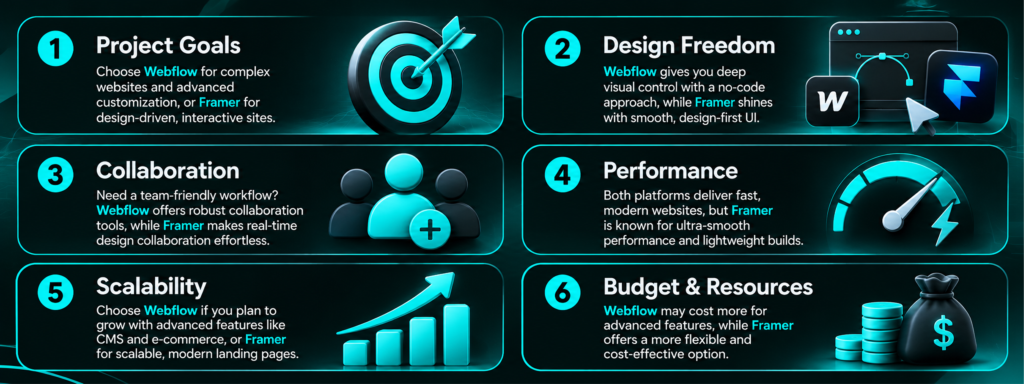
Framer vs Webflow factor 1: How much content you publish
This is the factor that ends most Framer vs Webflow debates, because it is a hard ceiling rather than a preference.
Webflow’s Premium site plan carries 20,000 CMS items across 40 collections, and its Team tier reaches 100 collections. Framer’s Pro plan starts at 2,500 items across 10 collections and extends with paid add-ons to roughly 40,000 items and 40 collections, at $20 per 10,000 items and $40 per 10 collections.
Raw capacity is the smaller half of the story. Webflow supports reference and multi-reference fields, so an author can belong to many posts, a product can carry several categories, and a case study can pull a client record. Framer has no native multi-reference field, so relating content across collections takes workarounds that grow brittle as the content set grows. On Framer vs Webflow, that single field type separates a content model that scales from one that needs patching.
Decide it this way: a blog, a careers page and a handful of case studies sit comfortably in Framer. A resource library, a programmatic SEO build, a location directory, or anything where one record needs to relate to many others belongs in Webflow.
If you are already past a few hundred interlinked records, our Webflow CMS development work starts with the content model rather than the design, because the model is what you live with.
Framer vs Webflow factor 2: Whether you sell on the site
Webflow ships a native store. Framer does not, and routes commerce through third-party tools.
Webflow Ecommerce runs as a separate charge on top of your site plan: Standard at $29 a month with a 2% transaction fee, Plus at $74 with the fee removed, and Advanced at $212. Cart, checkout, product CMS, inventory and order management are native, and products behave like CMS items, so your templates work the way the rest of the site does.
Framer has no native cart or checkout. You embed a Shopify buy button, a payment link, or a similar tool. For a handful of products that path is clean and cheap. For a real catalogue with variants, inventory and discount logic, you are maintaining two systems that do not share a content model.
Decide it this way: selling more than a few products on the site settles Framer vs Webflow in Webflow’s favour. A site that sends buyers to an existing Shopify or Amazon storefront leaves you free to choose on the other five factors.
Webflow ecommerce development is where we put brands that want the store and the marketing site on one content model instead of two.
Framer vs Webflow factor 3: Who edits and how many of them
Seat structure and role separation split Framer vs Webflow more than the headline prices suggest.
Webflow separates the Designer from the Editor, so a marketer can update copy without opening the canvas where layouts live. Seats bill on top of your Workspace plan: a full seat is $39 a month, a limited seat $15, and reviewer seats are free. That separation starts paying for itself around five people.
Framer runs one unified canvas with thinner permissions. The Editor seat is $20 a month and the Content Editor seat is $10, limited to CMS, localization and on-page editing with no canvas access. That Content Editor seat, introduced in May 2026, closed much of the gap for content teams.
Decide it this way: one to three people touching the site favours Framer on both cost and simplicity. Five or more, especially where non-designers publish regularly, favours Webflow’s role separation. The risk in Framer at larger team sizes is not the price, it is that permissions are thinner and layouts are easier to disturb.
Framer vs Webflow factor 4: What it actually costs at your shape
Framer bills on one axis plus seats. Webflow bills on two, and three once you sell.
Webflow charges a site plan for every published site and a workspace plan for the team that builds them, which is why the bill surprises people. Site plans run $0 Starter, $15 Basic annually with no CMS at all, and $25 Premium annually with the full CMS. Workspace plans run $19 Core or $49 Growth for in-house teams, and $16 Freelancer or $35 Agency. Ecommerce stacks on top. Monthly billing costs roughly 55 to 65 percent more than annual.
Framer runs $0 Free, $10 Basic and $30 Pro, with Pro growing through usage add-ons rather than a jump to a higher tier.
Run Framer vs Webflow against your own shape rather than comparing headline numbers:
| Shape | Framer | Webflow |
| One marketing site, one editor | Basic or Pro, plus one seat | Premium site plan, plus workspace, plus seat |
| One site, 5 editors, no store | Pro plus Content Editor seats | Premium, workspace, mix of full and limited seats |
| One site with a real store | Pro plus a third-party commerce tool | Premium plus an Ecommerce plan |
| Three client sites, one team | Three site plans plus seats | Three site plans plus one agency workspace plus seats |
Decide it this way: on Framer vs Webflow cost alone, at one small site with one or two editors, Framer is reliably cheaper. The gap narrows as content, seats and commerce enter, and it closes entirely once you need the CMS depth that only Webflow’s Premium tier provides.
Framer vs Webflow factor 5: Speed to launch against ceiling later
Framer gets you live sooner. Webflow gives you more room once you are there.
A designer coming from Figma is productive in Framer in roughly two weeks, because the canvas, the component model and the interaction patterns are familiar. Webflow asks you to understand CSS classes, the box model and HTML structure first, which is closer to four to six weeks before someone builds confidently.
That trade is the heart of Framer vs Webflow on build speed, and it runs in both directions. Webflow’s interaction system reaches further, with timeline-based scroll, component state machines and mouse-triggered events, and its markup control is finer, which matters when you manage schema and metadata across hundreds of pages. Framer’s animation work improved through 2026 and handles design-led motion well, with a lower ceiling on complex sequences.
Performance does not separate Framer vs Webflow, because it is a build quality question on both. Each platform can produce fast pages and each can produce slow ones, since heavy hero video, oversized imagery and large interaction libraries damage loading on either. The six Core Web Vitals fixes that clear most failing pages apply the same way regardless of which you choose.
Decide it this way: a launch deadline inside a month favours Framer. A site you expect to grow in structural complexity over two years favours Webflow.
Our Framer development team builds for the first case and our Webflow team for the second, which is the honest reason we keep both.
Framer vs Webflow factor 6: Your exit route
Webflow exports your code. Framer keeps your site on Framer.
A paid Webflow Workspace exports HTML, CSS and JavaScript. The export leaves behind CMS content, ecommerce, forms, user accounts and secondary locales, and CMS content comes out as CSV, so it is a real exit rather than a clean lift. Framer offers no code export, so a published Framer site runs on Framer’s infrastructure for as long as it runs.
This is the Framer vs Webflow factor that costs nothing until it suddenly matters, so weigh it against how likely a move actually is. Plenty of sites never leave the platform they launched on, and designing around an exit you will never take is its own cost. The factor matters most when procurement asks about vendor lock-in, when an acquisition is plausible, or when a parent company standardises on one stack.
Decide it this way: if someone in your business will one day ask for the code, start on Webflow. If that question will never come up, treat this factor as neutral and let the first five decide.
Either direction, Webflow migration is a content model exercise before it is a design exercise, and it goes faster when the model was built deliberately the first time.
Framer vs Webflow at a glance
The Framer vs Webflow differences that change a decision, in one view.
| Factor | Framer | Webflow |
| CMS capacity | 2,500 items, 10 collections on Pro, extendable to about 40,000 and 40 | 20,000 items across 40 collections on Premium, 100 collections on Team |
| Relational content | No native multi-reference field | Reference and multi-reference fields |
| Ecommerce | Third-party integrations | Native store from $29 a month plus a 2% fee on Standard |
| Localization | Native, around $20 per locale | Localize add-on at $9 or $29 depending on locale count |
| Seats | Editor $20, Content Editor $10, Viewer free | Full $39, limited $15, reviewer free |
| Entry price | $10 Basic, $30 Pro | $15 Basic, $25 Premium, plus a workspace plan |
| Code export | None | HTML, CSS and JS on a paid workspace |
| Ramp for a new designer | About two weeks | About four to six weeks |
| Best fit | Design-led sites under roughly 50 pages, small teams, fast launches | Content-heavy sites, stores, multi-locale builds, teams of five or more |
Which one we would pick for you
Run the six Framer vs Webflow factors in order and the answer usually appears by factor three. Heavy interlinked content, a real store, or a likely request for the code all point to Webflow. A design-led site under about fifty pages, a small team, and a launch date inside a month all point to Framer.
We have no stake in the Framer vs Webflow argument because we build on both, which means we have no reason to talk you into the one that fits us. Send us the page count, the content model and who will be editing, and we will tell you which platform we would put our own brand on. Start that conversation with those three details and the answer takes one reply.
We operate it like we own it.
Framer vs Webflow FAQs
Is Framer cheaper than Webflow?
On Framer vs Webflow pricing, at one site with one or two editors, yes. Framer Pro at $30 a month plus a $20 Editor seat undercuts a Webflow Premium site plan stacked with a workspace plan and a $39 full seat. The advantage narrows as seats and content grow, and reverses once you add a native store.
Can Framer handle ecommerce?
Framer has no native cart or checkout, so commerce runs through an embedded tool such as a Shopify buy button or a payment link. That works for a small product set. A catalogue with variants, inventory and discounts is better served by Webflow’s native ecommerce or by a dedicated store platform.
Which is better for SEO, Framer or Webflow?
Framer vs Webflow on SEO is close at small scale. Both cover meta tags, sitemaps, redirects and structured data, so a small site ranks fine on either. Webflow pulls ahead at scale through finer markup control, CMS fields dedicated to SEO, and schema set once on a collection template that then applies to every item in it.
Can you export your site from Framer?
No, and this is where Framer vs Webflow diverges most sharply. Framer does not offer code export, so a published site stays on Framer’s infrastructure. Webflow exports HTML, CSS and JavaScript on a paid workspace, without CMS content, ecommerce, forms or secondary locales.
How many CMS items can Framer handle?
Framer Pro starts at 2,500 items across 10 collections and extends with add-ons to roughly 40,000 items and 40 collections, at $20 per additional 10,000 items. Webflow Premium carries 20,000 items across 40 collections without add-ons.
Should a startup choose Framer or Webflow?
The Framer vs Webflow answer for a startup depends on which channel will carry growth. Framer suits an early-stage team shipping a marketing site fast with one or two people maintaining it. Webflow suits a startup that already knows content or commerce will carry the channel, since migrating later costs more than starting in the right place.