
Every year the same thing happens. A Shopify store that ran fine all year meets ten times its normal traffic and discovers what it could not handle. An app conflict breaks the cart. A discount code applies twice on a Shopify store doing its best trade of the year. The inventory sync lags and sells stock that shipped yesterday.
None of that is bad luck. It is untested load meeting an untested store.
The scale involved makes the case on its own. Shopify merchants moved $14.6 billion over Black Friday Cyber Monday weekend in 2025, up 27% year over year, with sales peaking at $5.1 million per minute at noon on Black Friday. More than 94,900 merchants had their single highest-selling day ever, which is the scale any Shopify Black Friday plan has to survive.
Black Friday 2026 falls on November 27, with Cyber Monday on November 30. Here are nine Shopify Black Friday checks worth running before then.
1. Test your Shopify store speed on a real phone
Mobile carries roughly 76% of BFCM traffic and 69% of orders, while desktop still converts at a higher rate. That gap is the whole argument. Most of your buyers arrive on the device where your Shopify store is slowest, and Shopify Black Friday traffic arrives the same way.
Run your key pages through a Core Web Vitals check and look at field data rather than a lab score, because what real users experience is what affects both ranking and conversion. Then do the unscientific version: open your Shopify store on your own phone, on mobile data, and buy something.
Homepage, collection page, product page, cart, checkout. If any step makes you wait, it is costing you orders at normal traffic and will cost you considerably more at peak.
2. Audit every app on your Shopify store
This is the highest-return hour you will spend. Most Shopify stores we inherit are carrying six to ten apps nobody uses anymore, each still loading scripts on every page.
Open the apps installed on your Shopify store and sort them into three groups: actively used, occasionally used, and forgotten. Uninstall the forgotten ones. For the rest, check whether any inject code into your theme, and confirm that removing an app actually removed its leftover code, because frequently it does not.
Fewer apps means a faster Shopify store and fewer things that can conflict when Shopify Black Friday traffic spikes.
3. Walk your Shopify checkout end to end
Checkout is where the money is decided and where the least Shopify Black Friday testing usually happens. Shopify Black Friday testing starts here: place a real order using each payment method you offer. Then place one with a discount code, one with a gift card, and one as a guest.
Check the obvious failure points. Do shipping costs appear before the final step, since unexpected costs remain the most common reason carts get abandoned? Are your tax settings correct for every region you ship to? Does the express checkout work on mobile?
If you are on Shopify Plus, confirm any checkout customizations still behave as expected after recent platform updates.
4. Verify inventory sync across every channel
If you sell anywhere besides your Shopify store, this is where peak season damage compounds quietly.
Confirm that your Shopify store stock levels update across every channel you sell on, and check the sync frequency rather than assuming it is real time. Then set buffer stock on your top SKUs, because a sync that lags fifteen minutes is fine in October and expensive on Black Friday morning.
We wrote about the wider version of this problem in our piece on running one inventory pool across channels.
5. Set a code freeze date and hold it
Pick a date, ideally two weeks before Black Friday, after which nothing changes on the Shopify store theme except genuine emergency fixes.
Every Shopify Black Friday post-mortem includes at least one story about a change made on November 24 that broke something nobody noticed until Friday. A freeze date removes that entire category of risk, and it forces the real work to happen in October when there is still time to test it.
Announce the date internally now so nobody is surprised by it later.
6. Test every Shopify discount before it goes live
Build your Shopify Black Friday promotions now and test them on the live store with a hidden product.
Check the combinations specifically. What happens when someone stacks a discount code on an automatic discount? Does free shipping apply where you expect? Are your exclusions working, or is your highest-margin product about to sell at 40% off because a collection was set up loosely?
Discount logic failures are among the most expensive Shopify Black Friday mistakes because they scale instantly and quietly.
7. Confirm fulfillment cut-offs and capacity
Talk to your 3PL or warehouse now about their Shopify Black Friday cut-off times, their capacity limits, and what happens if you exceed them.
Then set your Shopify store shipping deadlines based on what they actually confirmed, not what they managed last year. Publish those deadlines clearly on the product page and in the cart, since a customer who expected delivery before Christmas and did not get it costs you the order value plus the refund plus the review.
8. Cover customer service for the hours that matter
Pre-purchase questions convert, and Shopify Black Friday is when they arrive fastest. A shopper deciding between your Shopify store and a competitor at 9pm on Black Friday will buy from whoever answers first.
Work out who is covering messages across the weekend, including the evening spike. Prepare answers to your most common questions now so nobody is composing replies under pressure. If you run an automated first line, test what it says about shipping deadlines and returns before it says it to thousands of people.
9. Check tracking before the Shopify Black Friday traffic arrives
Attribution on a Shopify store breaks quietly. Confirm your conversion tracking is firing correctly, your server-side tracking is configured, and your ad platforms are receiving clean purchase events.
Do this in October, because discovering in December that November’s data was wrong means you cannot learn anything from your best trading month. It also means your ad platforms optimized against bad signals during the period they mattered most. Our paid media work always starts here for exactly that reason.
What most stores get wrong about Q4
Most teams treat Shopify Black Friday as a marketing problem when it is mostly an operations problem.
The creative, the offers, and the ad budget all matter to a Shopify Black Friday result. They matter considerably less than whether the site loads, the checkout works, the stock numbers are accurate, and someone answers the question that is standing between a shopper and a purchase.
Peak season amplifies whatever a Shopify store already is. A store that converts well in October converts better in November. A store with friction in the checkout does not suddenly lose that friction because the traffic tripled. It just loses more orders per hour.
Build the list once, use it every year
The specific checks matter less than having your Shopify Black Friday list written down.
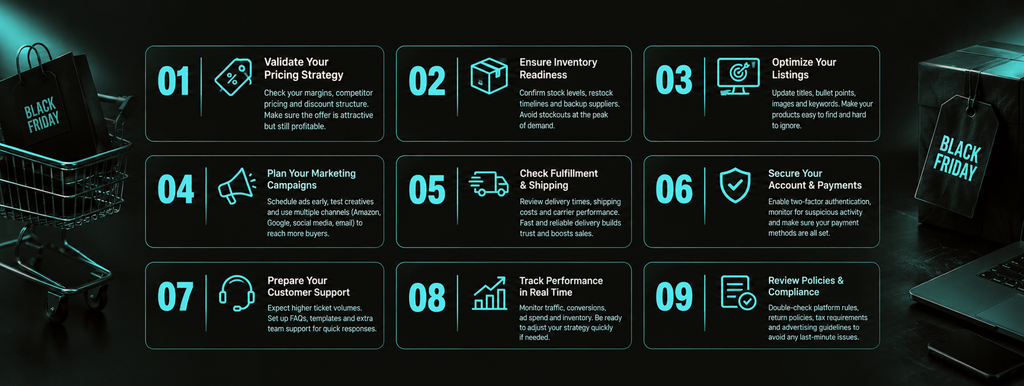
Turn these nine Shopify store checks into a document with a named owner for each and a date by which it is done. Run it every October, and your Shopify Black Friday preparation stops starting from zero. The value compounds, because next year you start from a list that already reflects what broke last time rather than rebuilding it from memory in a panic.
That is the difference between a store that survives peak season and one that uses it. For context on where the wider market lands each year, the National Retail Federation publishes holiday spending data worth planning against, and Shopify’s own investor releases carry the platform-level numbers.
Shopify Peak season rewards the prepared
Shopify Black Friday does not create problems. It reveals the ones already present and multiplies them by volume.
At Treszon, we run Shopify builds and store operations against a checklist like this one every year, because we operate every brand we run like we own it. Speed, checkout, stock accuracy, and tracking are unglamorous work, and they decide more of a Shopify store’s quarter than the creative does.
If you would rather have a team running this alongside you, that is a conversation worth having.
The store you take into November is the one you built in October.
Frequently asked questions
When is Black Friday 2026?
November 27, with Cyber Monday on November 30. Cyber Week effectively runs from Thanksgiving on November 26 through the following Monday.
How far in advance should Shopify Black Friday preparation start?
Eight to twelve weeks is a realistic window for Shopify Black Friday work. Speed work, app audits, and fulfillment conversations all need lead time. October is the last comfortable month to start.
Which check matters most?
Mobile speed and checkout, because they affect every visitor to your Shopify store rather than a subset. An app audit usually delivers the fastest measurable improvement.
What is a code freeze and do we really need one?
It is a date after which nothing changes on the Shopify store theme except emergency fixes. It removes the single most common cause of peak season failures, which is a late untested change.
Should we discount deeper than last year?
Only if your Shopify store margin supports it after commission, ads, shipping, and returns. Deeper discounts on a weak margin turn a record revenue month into a disappointing profit one.
What should we check first if time is short?
Open your Shopify store on your phone and buy something. Most teams find at least one thing they would not have shipped.